
OmegaT with Premium DeepL Connector — Product Overview
OmegaT with Premium DeepL Connector
OmegaT with Premium DeepL Connector is a professional-grade DeepL Neural Machine Translation integration for OmegaT, the free and open-source Computer-Aided Translation (CAT) tool. Developed and distributed by ILOHA OpenLab LLC, it brings enterprise-ready features to translators who demand more from their MT workflow.
Important: This plugin requires a separate DeepL API account from deepl.com. Both the DeepL API Free and API Pro tiers are supported. A DeepL API key is not included with this product.
What is OmegaT?
OmegaT is a free CAT tool released under the GNU GPL license, used by professional translators, translation agencies, and localization teams around the world. It supports translation memory, glossaries, and a wide range of file formats.
Hiroshi Miura, Representative of ILOHA OpenLab, is the lead developer of the OmegaT project — giving this plugin an unmatched depth of integration and reliability.
Key Features
1. Full DeepL API Integration
The plugin connects to DeepL API v2 and delivers high-quality translation suggestions directly in OmegaT’s Machine Translation pane as you work through segments.
- Auto-fetch mode: suggestions appear automatically each time you move to a new segment
- Manual mode: fetch on demand with
Ctrl+Shift+M— ideal for conserving API quota on large projects - Supports both DeepL API Free (500,000 characters/month) and DeepL API Pro (plan-dependent limits)
Tip: For large projects or tight API quotas, disable automatic fetching and use the keyboard shortcut instead. This avoids consuming quota on segments you won’t use MT for.
2. Formality Control
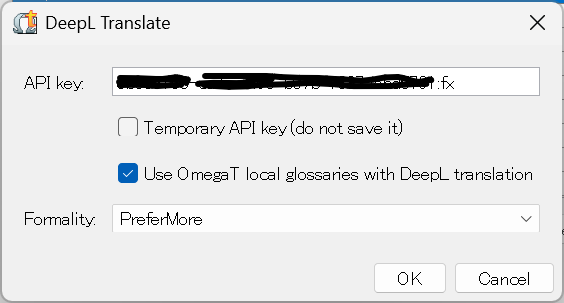
Choose how formal or informal DeepL’s output should be — particularly useful for languages like German, French, Japanese, and others where register matters.
| Setting | Behavior |
|---|---|
| Default | DeepL selects the appropriate register for the target language |
| PreferMore | Prefer formal language; falls back to Default if unsupported |
| PreferLess | Prefer informal language; falls back to Default if unsupported |
| More | Always use formal language (returns an error if unsupported) |
| Less | Always use informal language (returns an error if unsupported) |
Use PreferMore or PreferLess rather than More or Less if you are unsure whether your target language supports formality control.
3. OmegaT Glossary Integration
When enabled, the plugin sends terms from OmegaT’s active glossary files to DeepL as translation hints, encouraging the engine to use your preferred terminology. As shown in the screenshot above, simply check “Use OmegaT local glossaries with DeepL translation” in the configuration dialog.
- Supported formats:
.txt(tab-separated) and.tbx - Both read-only reference glossaries and writable project glossaries are included
Note: Glossary terms are transmitted to and stored on DeepL’s servers. If you work with confidential terminology, review and remove glossaries periodically from your DeepL account management page.
4. Proxy Authentication Support
Works seamlessly in corporate network environments that require a proxy. The plugin uses OmegaT’s built-in proxy settings (Options → Preferences → Proxy Login), including proxy authentication.
Product Variants
Windows Package
A signed OmegaT installer for Windows 11, bundled with the Premium DeepL plugin, an up-to-date HiDPI-compatible Java runtime, and a setup manual. No manual plugin installation required — everything is pre-installed.
Mac Package
A notarized OmegaT for Apple Silicon Macs, bundled with the Premium DeepL plugin, an up-to-date HiDPI-compatible Java runtime, and a setup manual. Ready to use out of the box on M1/M2/M3/M4 systems.
Plugin Only
The DeepL plugin JAR and setup manual for users who already have OmegaT 6.1.0 or later installed. Compatible with Windows, macOS, and Linux.
Installation (Plugin Only Variant)
- Download the plugin JAR from your LemonSqueezy order page after purchase
- Open OmegaT and go to
Options → Preferences → Plugins - Click Install plugin from disk and select the downloaded JAR
- Restart OmegaT
For the Windows and Mac packages, OmegaT and the plugin are pre-installed — simply enter your DeepL API key in Preferences to get started.
Pricing
For current pricing and to purchase, please visit our online store.
| Edition | Description |
|---|---|
| Early Access | Beta access plus final release. Limited to the first 100 customers. |
| Professional | Final release with ongoing updates. |
| Plugin Only | The DeepL plugin for existing OmegaT 6.1.0+ installations. |
Our Commitment to Open Source
This product offers premium features ahead of general availability, but ILOHA OpenLab’s mission is rooted in the sustainability of open ecosystems. We are committed to contributing the technical work developed in this plugin back to the OmegaT project over time. Purchasing the Premium Edition directly supports ongoing development of OmegaT and the broader OSS translation tooling ecosystem.
Frequently Asked Questions
Where do I get a DeepL API key?
Visit deepl.com/pro-api, sign in or create an account, and copy your key from the Authentication Key section. The API Free tier provides up to 500,000 characters per month at no cost. Free tier keys end with :fx — the plugin uses this suffix to select the correct API endpoint automatically.
Is there a Linux version? The Windows and Mac packages do not target Linux, but the Plugin Only variant works on any platform running OmegaT 6.1.0 or later, including Linux.
Can I install this into my existing OmegaT?
Yes — if you have OmegaT 6.1.0 or later, the Plugin Only variant installs directly into your existing setup. Check your version under Help → About.
How do I update the plugin? When a new version is released, simply install the new JAR using the same procedure. OmegaT 6.1.0 and later automatically load the highest-versioned copy, so no manual cleanup of old files is needed.
What happens if my API quota runs out? The plugin will display a “Quota exceeded” message in the Machine Translation pane. You can upgrade to DeepL API Pro or wait for your monthly quota to reset.
For purchase inquiries, please visit our online store or contact us at [email protected].
Thank you for your continued support of ILOHA OpenLab’s mission to engineer sustainable open ecosystems.